
Skip to content
  • Who We Help

    Dioceses

    A communications system built from dioceses’ feedback.

    Associations

    When you’re extremely busy, even a morsel of help can make the world of difference[.

    Small Schools

    Engage your school community with one simple system and a lot of useful support.

    Large Schools

    A simple communications solution for stretched school staff.

    Multi-campus Schools

    A simple communications solution for stretched school staff.

    Parents & Caregivers

    Engage in your child’s education and feel fully connected.

    Advertisers

    Helping parents and guardians grow their businesses through school communities.

    Learn

    • Enterprise Solutions
    • Customer Stories
    • FAQs
    • News
    Book a demo
  • Our Products

    Newsletters

    Delivering the clear, consistent communication that is central to community connection.

    Websites

    Purpose-built sites for the education sector.

    Enterprise

    A communications platform balancing central governance with individual school identity.

    Image Guardian™

    Manages image consent, access and removal to protect students.

    Emails and Texts

    Send consistent communication at the touch of a button.

    Szapp

    A parent mobile app for instant communication.

    EduTranslate

    Translating words and their context for inclusive communities.

    Session Keeper

    Parent-teacher booking system improved through school feedback.

    Existing Customers

    • Login
    • Knowledgebase
    • New support ticket
    • Book training
    Book a demo
  • Company

    About Us

    Schoolzine began with a simple belief: when parents are engaged in their child’s school life, students do better. Nearly two decades on, that belief still guides everything we build.

    Learn more about us
    View our brands
    Last story from dioceses

    St Simon Peter Catholic Primary School WA

    Schoolzine worked closely with the school to integrate a responsive digital newsletter, mobile app and website — all aligned with the school’s branding and supported by an easy-to-use CMS.

    View all dioceses stories
    Last story from small schools

    Quorn Area School SA

    Schoolzine worked closely with the principal and leadership team to integrate one platform for parent and community engagement: an accessibility-compliant, responsive digital newsletter, mobile app and custom-built website.

    View all small school stories
    Last story from large schools

    Mount Annan High School NSW

    School teams, like parents, are busy people, so it was important to choose a provider that offered multiple channels without duplication of effort. 

    View all large school stories
  • Contact
  • Login
  • Who We Help
    • Dioceses
    • Associations
    • Small Schools
    • Large Schools
    • Multi-campus schools
    • Parents & Caregivers
  • Our Products
    • Newsletters
    • Websites
    • Image Guardian
    • Enterprise
    • Szapp
    • Emails and Texts
    • EduTranslate
    • Session Keeper
  • Company
    • About
    • Our Brands
    • Customer Stories
    • FAQs
    • News
  • Contact
  • New Support Ticket
  • Book a demo
  • Who We Help
    • Dioceses
    • Associations
    • Small Schools
    • Large Schools
    • Multi-campus schools
    • Parents & Caregivers
  • Our Products
    • Newsletters
    • Websites
    • Image Guardian
    • Enterprise
    • Szapp
    • Emails and Texts
    • EduTranslate
    • Session Keeper
  • Company
    • About
    • Our Brands
    • Customer Stories
    • FAQs
    • News
  • Contact
  • New Support Ticket
  • Book a demo
  • Login
Get Started

Newsletters

6
  • Sending and distributing a newsletter
  • Previewing and printing a newsletter
  • Working with articles
  • Adding content to an article
  • Creating a newsletter
  • Getting started with the newsletter builder

Calendar

2
  • Importing events
  • Adding an event to your calendar

Contacts and Groups

1
  • Creating a group and adding contacts
View Categories
  • Home
  • Docs
  • Newsletters
  • Creating a newsletter

Creating a newsletter

2 min read

0:00 / 2:03
  • View as Markdown Open this page as plain Markdown (opens in a new tab)
  • Open in ChatGPT Ask questions about this page (opens in a new tab)
  • Open in Claude Ask questions about this page (opens in a new tab)
  • Open in Google AI Studio Ask questions about this page (Google account required) (opens in a new tab)

Each issue of your newsletter starts in the Control Centre. Once it’s set up, you add the articles in the newsletter builder.

Create the newsletter #

  1. Log in to your Control Centre and select Newsletters (previously eNewsletters) from the menu.
  2. Click New eNewsletter at the top of the list.
  3. Type a Newsletter Title, for example “Term 4 Week 3”. Families see this title at the top of the newsletter and in your newsletter archive.
  4. Choose a Publication. Most schools use School Newsletter. The publication decides the design and who the newsletter goes to.
  5. Click Save in the bottom-right corner.

The Newsletter Title and Publication fields

Your newsletter is saved as Unpublished, so nobody can see it until you’re ready. From here, click Edit Content to open the newsletter builder and add your articles.
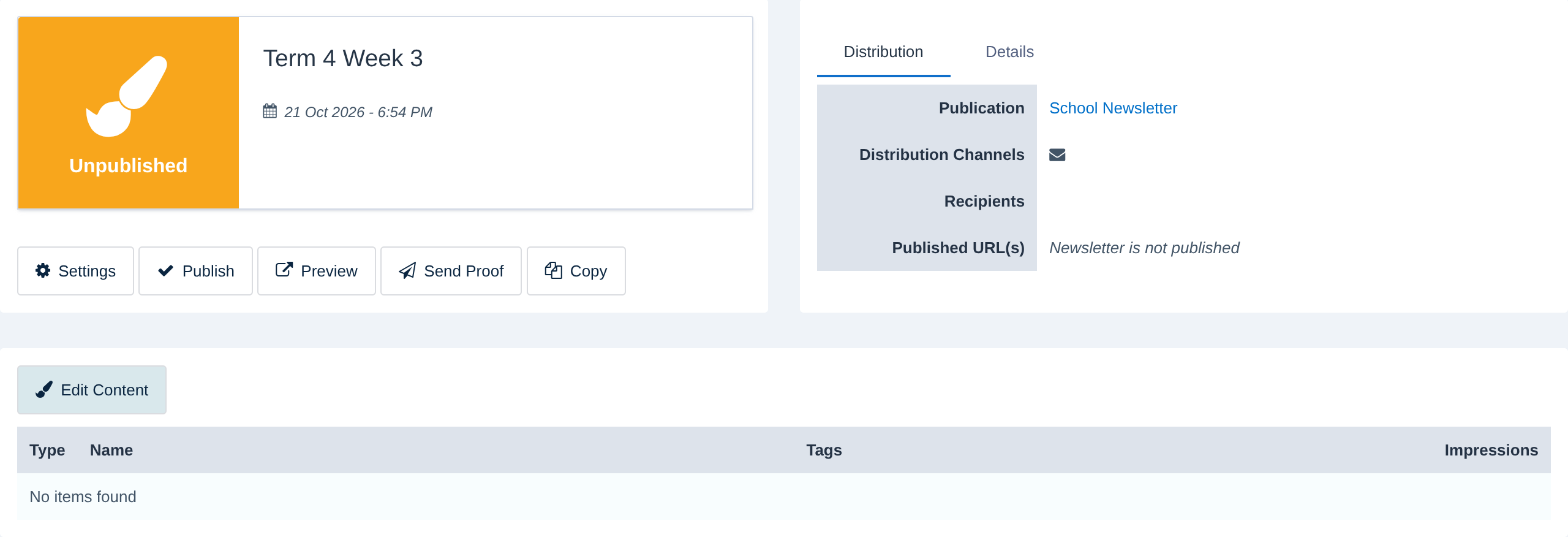
A new, unpublished newsletter with the Edit Content button

Advanced settings #

Click Advanced Settings before you save to fine-tune the newsletter. You can come back and change these later from the newsletter’s Settings button.
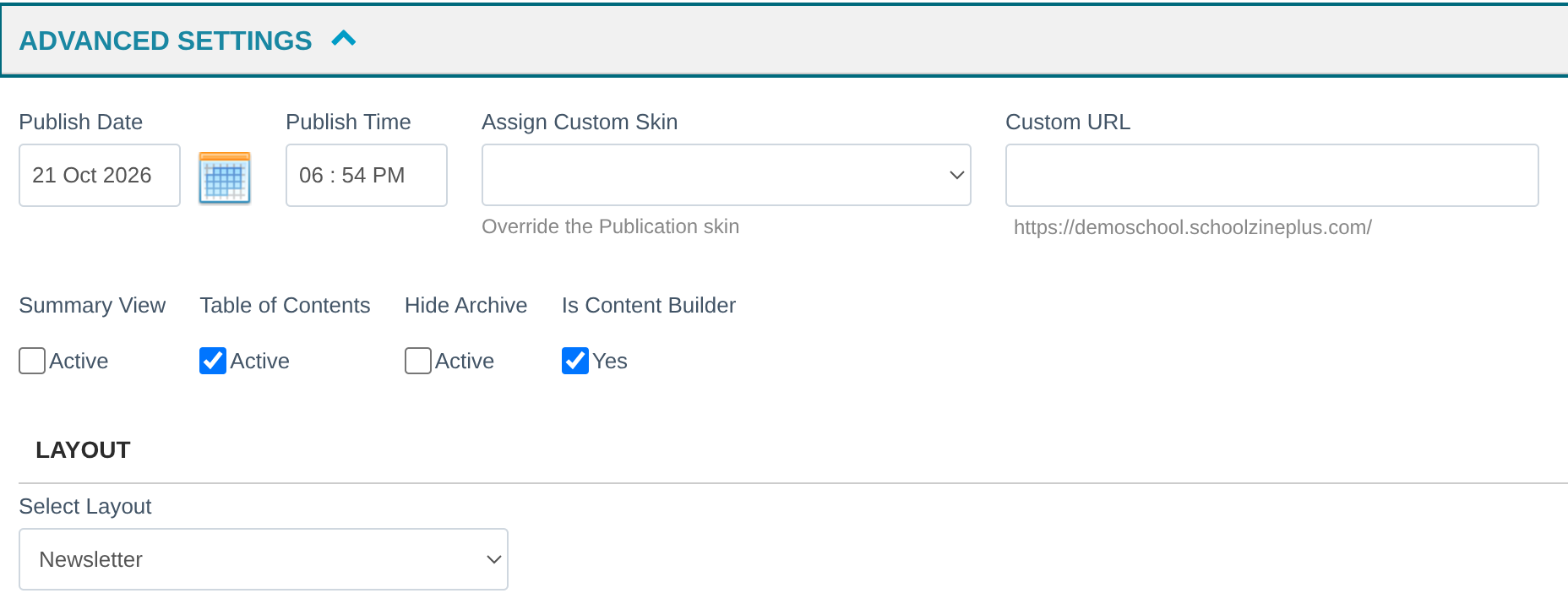
The Advanced Settings section
  • Publish Date and Publish Time: when the newsletter goes live. They start as the current date and time.
  • Assign Custom Skin: use a different design for this issue only, such as a Christmas or end-of-year edition. Leave it blank to use your publication’s usual design.
  • Custom URL: give this issue its own web address. Each newsletter needs a different one.
  • Table of Contents: shows a list of articles at the top of the newsletter. It’s on by default. For a newsletter with three articles or fewer, you may prefer to turn it off.
  • Hide Archive: keeps this issue out of your newsletter archive. This is handy for special editions.
  • Summary View and Layout: leave these as they are unless our Customer Success Team has set them up for your school.

Tip: Need a newsletter that looks like last week’s? Open last week’s newsletter and click Copy. You’ll get a new newsletter with copies of its articles, ready to update. Changes to the copies won’t affect last week’s issue.

Related articles #

  • Getting started with the newsletter builder
  • Adding content to an article

Need a hand? #

Our Customer Success Team is here to help. Call 1300 795 503, email [email protected] or start a live chat in your Schoolzine account.

Updated on 21/10/2026
getting started newsletter builder

What are your Feelings

  • Happy
  • Normal
  • Sad

Share This Article :

  • Facebook
  • X
  • LinkedIn
  • Pinterest
Adding content to an articleGetting started with the newsletter builder

Leave a Reply Cancel reply

Your email address will not be published. Required fields are marked *

Table of Contents
  • Create the newsletter
  • Advanced settings
  • Related articles
  • Need a hand?

Better communication.
Stronger school communities.
Real support.

Get in touch
Book a demo

Company

  • About Us
  • News
  • Customer Stories
  • Contact Us

Solutions

  • Diocese
  • Associations
  • Large School
  • Small School
  • Multi-campus School
  • Parents & Caregiver
  • Advertisers

Support

  • Book a Demo
  • Existing Customer Support
  • Knowledgebase
  • Login
  • FAQs
  • Installing Szapp

Social

  • Facebook
  • Instagram
  • Linkedin
  • Youtube

Legal

  • Terms
  • Privacy
  • Cookies
  • Release Notes
  • System Status

© 2026 Schoolzine. All rights reserved. ABN: 79 123 804 991